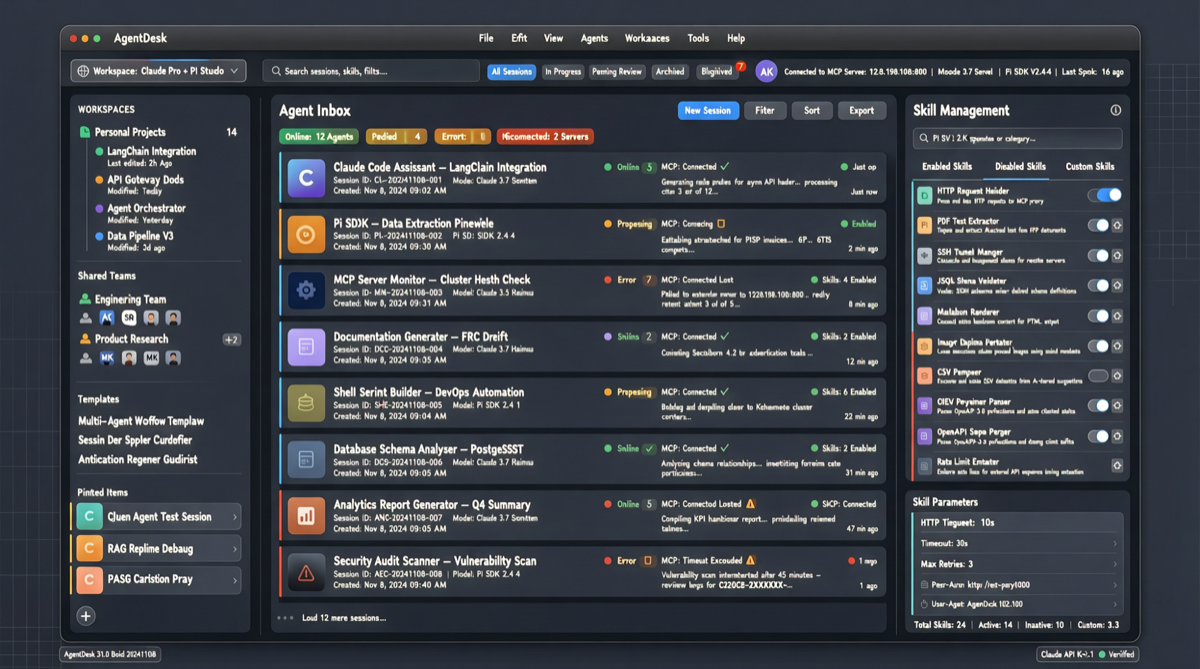
The biggest friction in using AI agents for development or work isn’t model capability—it’s workflow management: multitasking, tool connections, permission control, session persistence. These “peripheral problems” often take more time than the actual AI conversation.
The Craft.do team (behind craft.do) has open-sourced Craft Agents under Apache 2.0, releasing their internal agent workbench. It integrates both Claude Agent SDK and Pi SDK, using a single desktop app to manage multi-sessions, MCP connections, multiple LLM providers, and remote server deployment.
The Problem It Solves
Anyone who has used Claude Code or Cursor knows that once you start handling multiple tasks simultaneously—fixing a bug, researching docs, connecting an API—the workflow fragments quickly. Craft Agents’ core idea: treat agent sessions like an email inbox.
- Multiple parallel sessions, each with independent status (Todo → In Progress → Needs Review → Done)
- Flag important sessions, archive them, AI auto-naming
- Full conversation history saved to disk, restore anytime
Core Capabilities
Multi-LLM Provider Support
Not limited to Anthropic:
- Anthropic: API Key or Claude Max subscription
- Google AI Studio: Gemini models
- ChatGPT Plus: Via Codex OAuth
- GitHub Copilot: OAuth authentication
- OpenAI API: Direct key
Set default provider per workspace, or choose different models per session.
MCP Connection Automation
This is Craft Agents’ standout differentiator. Traditional MCP configuration requires manual JSON editing—here, the agent handles everything:
- Tell the agent “add Linear as a source”—it finds public APIs and MCP servers, reads docs, configures credentials
- Have an MCP config JSON? Paste it, the agent handles the rest
- Supports local stdio-mode MCP servers (npx commands, Python scripts, local binaries)
- Supports custom APIs: paste OpenAPI specs, screenshots, endpoint URLs, the agent auto-parses
Currently integrated with 32+ Craft document tools (blocks, collections, search, tasks), plus Google (Gmail, Calendar, Drive, YouTube, Search Console), Slack, Microsoft REST APIs.
Permission Control
Three-level permission system, switch with SHIFT+TAB:
| Mode | Display | Behavior |
|---|---|---|
| safe | Explore | Read-only, blocks all write operations |
| ask | Ask to Edit | Requests approval before each action (default) |
| allow-all | Auto | Auto-approves all commands |
Remote Server Mode
Craft Agents can run headless on a remote VPS, with the desktop app as a thin client:
# On server
CRAFT_SERVER_TOKEN=$(openssl rand -hex 32) bun run packages/server/src/index.ts

# Connect from desktop
CRAFT_SERVER_URL=wss://your-server:9100 CRAFT_SERVER_TOKEN=token bun run electron:start
Keep long-running sessions alive on powerful remote machines, access from any device.
Other Highlights
- Multi-file Diff: VS Code-style window to view all file changes at once
- Skills System: Per-workspace specialized agent instructions
- File Attachments: Drag-drop images, PDFs, Office docs with auto-conversion
- Event-driven Automations: Auto-create agent sessions on label changes, schedules, tool usage
- Import Claude Code Skills: One-command migration of existing skills and MCP configs
Comparison with Alternatives
| Dimension | Craft Agents | Claude Code | Cursor |
|---|---|---|---|
| Session Management | Multi-session inbox + status workflow | Single session terminal | Single session in editor |
| Multi-LLM | 5+ providers, mix-and-match | Anthropic only | Multiple but manual switching |
| MCP Connection | Agent auto-configures | Manual JSON editing | Manual configuration |
| Permission Control | Three modes, hotkey switch | Built-in ask/auto | No fine-grained control |
| Remote Mode | Native headless server | Requires manual SSH | Requires setup |
| Use Case | Document + agent hybrid workflow | Pure code development | Code editing |
The trade-off: Requires bun and Electron environment; MCP auto-connection depends on agent understanding—complex APIs may need manual intervention; relatively new project (v0.8.13), stability needs more validation.
Quick Start
One-line install (recommended):
# macOS / Linux
curl -fsSL https://agents.craft.do/install-app.sh | bash

# Windows PowerShell
irm https://agents.craft.do/install-app.ps1 | iex
Build from source:
git clone https://github.com/lukilabs/craft-agents-oss.git
cd craft-agents-oss
bun install
bun run electron:start
Choose API connection (Anthropic, Google AI Studio, ChatGPT Plus, GitHub Copilot, or OpenAI), create a workspace, and start.
Worth Watching
- Built by craft.do team using Craft Agents itself—a fully agent-native development mode
- 82 commits, 60 tags, frequent releases—latest v0.8.13 published 19 hours ago
- 235 Issues, 88 PRs, active community
- Apache 2.0 license, commercially friendly
Limitations: Currently desktop-only (macOS/Linux/Windows), no mobile support yet; remote server mode requires self-managed VPS and TLS certificates.
Sources
- GitHub repository: https://github.com/lukilabs/craft-agents-oss
- Installation page: https://agents.craft.do